BLOG · WALLETS AND BANKING
How to track your JazzCash and Easypaisa spending
Short answer: open your wallet's transaction history once a week and sort every line into one of three groups: real spending (bills, mobile load, shopping, fees), money that only moved between your own accounts (bank to wallet, wallet to cash), and money that went to or came from people (udhaar given, udhaar returned). Write down why each payment happened while you still remember. The wallet only shows what left the account. It does not know what the money was for, and it keeps a short history in the app, so a weekly habit matters.
Why is wallet spending so hard to keep track of?
Wallet payments are small, fast and frequent. By month end the balance is lower, but the list in the app does not tell you how much was actually spent. Three things make it harder:
- Transfers look like spending. Moving Rs 5,000 from your bank to your wallet is not an expense. It is the same money in a different pocket.
- People payments are mixed in. Money sent to a friend can be a loan, a gift or your share of a dinner. Only you know which.
- History is short. Easypaisa says its app shows the last 30 days. After that you need a statement.
Where can you see your wallet history?
Easypaisa. According to Easypaisa's FAQ, tap your profile picture, then Transaction History. There you can see an account summary and your transactions, and download an e-statement, which is sent to your registered email. The app shows the last 30 days. For older history, Easypaisa says to request a statement by calling 3737 (from Telenor) or 042-111-003-737 (from other networks). Its schedule of charges for October to December 2026 lists the mini statement as free.
JazzCash. JazzCash's terms and conditions say you can view at least your last five transactions free on your phone, and that electronic statements are issued on your written request. Its schedule of charges for July to September 2026, the latest one we found on its website, lists the mini statement in the app as free. App menus change often, so look for "transaction history" or "statement" in the app, or ask JazzCash's helpline.
Tip: download or screenshot your statement at the end of each month. Then the 30-day window does not matter.

Which wallet entries are spending, and which are not?
Sort each line like this (amounts are examples):
| Wallet entry | Is it spending? | How to record it |
|---|---|---|
| Electricity bill paid, Rs 3,200 | Yes | Expense: bills |
| Mobile load, Rs 300 | Yes | Expense: phone |
| Paid a shop by QR, Rs 850 | Yes | Expense: what you bought |
| A service fee or charge | Yes | Expense: fees |
| Bank to wallet top-up, Rs 5,000 | No | Transfer between your own accounts |
| Cash withdrawn from wallet, Rs 4,000 | No | Transfer from wallet to cash (the fee is an expense) |
| Sent Rs 2,000 to a friend as a loan | No | Udhaar you gave: they owe you |
| Friend sent Rs 2,000 back | No | Udhaar returned, linked to the loan |
| Salary or refund received | No | Income |
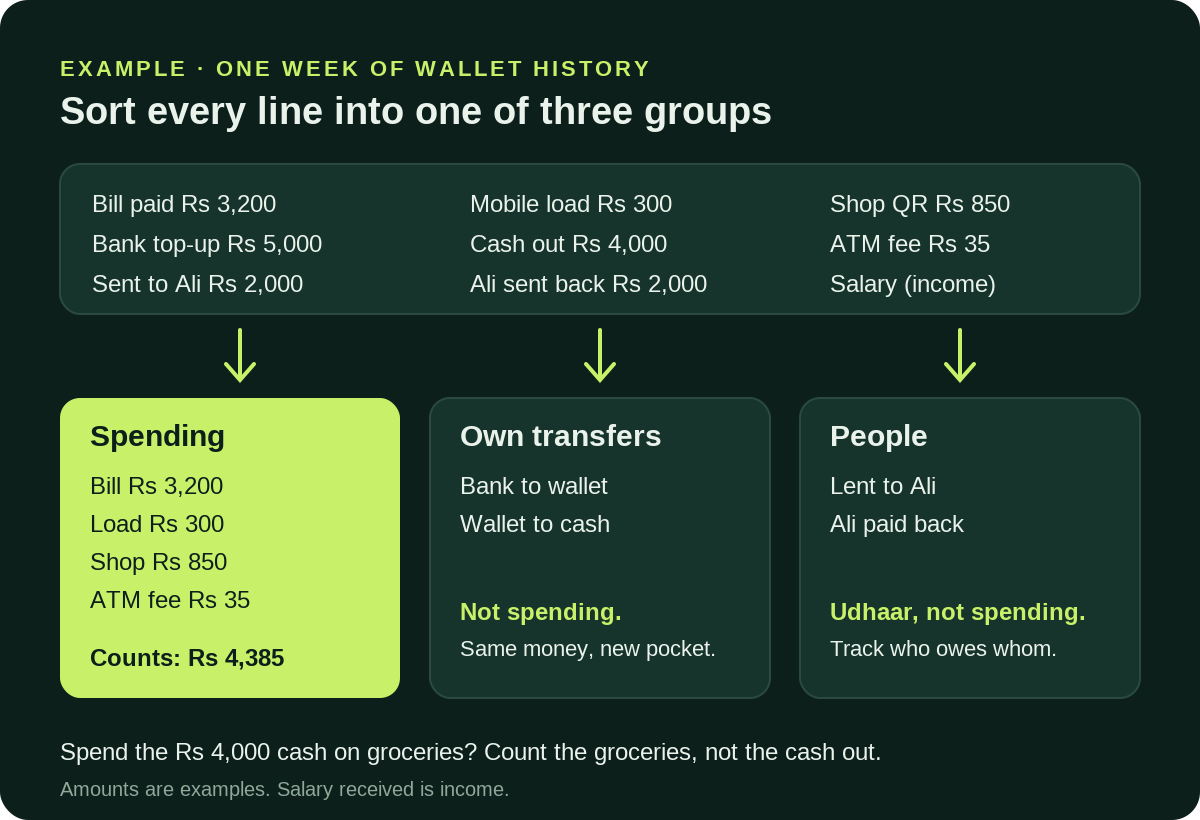
The cash line is a common mistake. If you withdraw Rs 4,000 and later spend it on groceries, count the groceries, not the withdrawal. Counting both doubles your spending.
Which wallet fees should you record?
Fees are small, but they are real spending. These are from each wallet's own published schedule of charges. Taxes may be added on top, and charges can change every quarter, so check the current schedule in your app or on the wallet's website.
| Charge | JazzCash (Jul to Sep 2026) | Easypaisa (Oct to Dec 2026) |
|---|---|---|
| Send to another account of the same wallet | Free | Free |
| Transfer to a bank account (IBFT) | Free up to Rs 25,000 a month in total, then 0.1% or Rs 200, whichever is lower, plus a Rs 1.55 processing fee | Charged above Rs 25,000 a month |
| ATM cash withdrawal | Rs 35 including tax | Rs 35 including tax; free at Easypaisa Bank branch ATMs |
| Utility bill from wallet | Rs 5 each for the first 3 bills a month, Rs 20 for the 4th to 9th, Rs 30 from the 10th | "Fair usage pricing" applies; see the schedule |
| Mini statement | Free | Free |
Two more lines worth knowing. JazzCash's schedule also lists a Rs 1 platform fee per transaction made in the app. Easypaisa's schedule notes that 0.8% withholding tax applies to non-filers who withdraw more than Rs 50,000 in a day. That is a government tax, so ask FBR or a tax adviser if it affects you.
A 10-minute weekly routine
- Pick a fixed day, for example Friday night.
- Open your history in each wallet you use.
- Sort each line into spending, own transfer, or people (the table above).
- Write the reason next to anything that is not obvious: "Ali, lent", "Ammi, medicine", "split dinner".
- Note fees as spending.
- Check udhaar: who still owes you, and whom you still owe.
- Save the statement at month end, before the 30-day window closes.
How Z30 fits in
Z30 does not connect to JazzCash, Easypaisa or any bank. It does not read your SMS or import statements, and it never moves money. What it does today: you type what happened in one line, in English or Roman Urdu, and it records it. For example jazzcash se bijli bill 3200 as a bill expense, HBL se easypaisa 5000 as a transfer between your own accounts (not spending), or Ali ko 2000 udhaar diye as money Ali owes you. If something important is unclear, it asks one short question. Every new account gets 3 months free; paid plans start after that.
FAQ
Is money sent to a friend an expense?
It depends on why. A loan is udhaar (they owe you), a gift or your share of a bill is spending. Write the reason on the same day.
Is topping up my wallet from my bank spending?
No. It is a transfer between your own accounts. Count the money when you spend it from the wallet.
How far back can I see my Easypaisa history?
Easypaisa says the app shows the last 30 days. For older history, download an e-statement or call its helpline to request a statement.
Do wallet fees stay the same?
No. Both wallets publish a schedule of charges, usually by quarter. Check the current one before relying on any number.
Sources
- Easypaisa FAQs, Easypaisa, checked November 4, 2026 (transaction history path, 30-day window, e-statements, statement helpline)
- Schedule of Bank Charges, Branchless Banking, October 2026 to December 2026, Easypaisa Bank (transfers, IBFT, ATM fee, bills, mini statement, 0.8% withholding tax note)
- JazzCash terms and conditions, JazzCash, checked November 4, 2026 (last five transactions free, electronic statements on request)
- JazzCash schedule of charges, July 1 to September 30, 2026, JazzCash circular of June 30, 2026 (wallet transfers, IBFT, ATM fee, utility bills, mini statement, app platform fee)
Try it with your own money: one line at a time.
Start freeRead next
- GUIDEExpense tracker in Roman Urdu: track money by typing, not filling forms
Track expenses, salary and udhaar by typing in Roman Urdu or English, the way you'd text a friend. How it works, examples, and what it does when an entry is unclear.
- How to keep track of money you send to family every month
For salary earners in Pakistan who support parents or siblings: how to separate regular support, one-off help and udhaar, and set a limit you can keep.
- Rent and advance: how to keep a clear record of what you paid and what you get back
Paying rent and an advance (security deposit) on a salary? What to write down so you can prove every payment and get your advance back without an argument.
- How to plan school fees across the whole year on a salary
For salary earners with children in school: turn the big yearly costs into a small monthly amount, so the fee month does not break your budget.